
SubPlus: Display Multiple YouTube Subtitles – Enhance Learning
Cara Install Ekstensi Chrome
- Klik tombol "Add to Chrome" di atas.
- Anda akan diarahkan ke Chrome Web Store.
- Klik "Add to Chrome" pada halaman ekstensi.
- Konfirmasi dengan klik "Add Extension" pada popup.
- Ekstensi akan otomatis terpasang dan ikon muncul di toolbar.
- Klik ikon ekstensi di toolbar untuk mulai menggunakan.
Screenshot
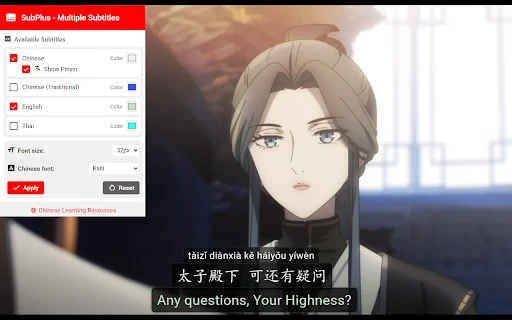

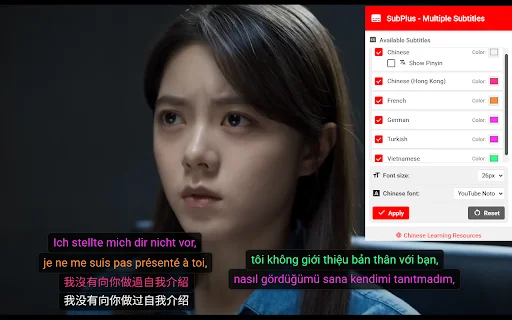

Are you struggling to keep up with YouTube content in foreign languages? Whether you are a student mastering a new vocabulary or a professional analyzing technical videos, SubPlus is the ultimate browser extension designed to optimize your viewing experience. By enabling you to display multiple subtitle tracks simultaneously, this tool bridges the gap between passive watching and active learning, ensuring you never miss a nuance in the dialogue.
For American viewers and global language learners, SubPlus provides a seamless way to overlay native and translated subtitles side-by-side. Stop switching between tabs or struggling with single-track limitations. With customizable font sizes, colors, and positioning, SubPlus puts you in control of your screen, making it the perfect companion for language immersion, accessibility, and content comprehension right from your browser.
Key Features
- Dual Subtitle Display: Watch videos with two or more subtitle tracks at once.
- Custom Positioning: Drag and drop subtitles to any area on the video player.
- Personalized Styling: Adjust font sizes and assign unique colors to each language track.
- Chinese Language Optimization: Specialized support for Pinyin and KaiTi font formatting.
- Performance Focused: Lightweight design that only activates when you need it.
- Quick Copy: Easily grab subtitle text with a simple Ctrl+C on hover.
- Intuitive UI: A modern popup menu for effortless configuration and control.
- Enhanced Accessibility: Ideal for viewers who require multiple language aids for better comprehension.
How to Use
- Navigate to any YouTube video that has existing closed captions available.
- Click the SubPlus icon in your browser toolbar to open the control menu.
- Press the “Activate SubPlus” button to initialize the overlay.
- Select your preferred subtitle languages and customize the appearance settings.
- Click “Apply” and enjoy a fully customized, multi-subtitle viewing experience!
FAQ
Does SubPlus automatically translate YouTube videos?
No, SubPlus only displays existing subtitle tracks provided by the video uploader or YouTube’s auto-generated captions. It does not perform real-time translation.
Can I use this with hardcoded subtitles?
No, the extension cannot interact with hardcoded (burned-in) subtitles that are part of the video file itself.
How do I change the color of the subtitles?
Simply open the SubPlus popup menu, navigate to the color customization settings, and select a distinct color for each track to improve visual clarity.
Is this extension heavy on browser performance?
Not at all. SubPlus is designed to be lightweight and only activates when you explicitly trigger it, ensuring your browser remains fast.
Does it work on all YouTube videos?
It works on any YouTube video that has at least two subtitle tracks enabled in the standard YouTube settings.
Take control of your YouTube learning journey today. Install SubPlus and start watching videos with the clarity you deserve. Download the extension now and transform how you consume global content!
Users find SubPlus to be a highly useful tool for language learning, though some require more guidance on how to enable multiple tracks.
Kelebihan
- Useful for language learning
- Great for improving comprehension
- Simple and effective tool
Kekurangan
- Interface for adding multiple languages is not intuitive for all users
Ulasan Pengguna
Usefull
How do I add multiple languages? After activating, it only shows the default English track, and I don't see any buttons to add another language.
Great tool to learn new language while watching your favorite show
| ID Ekstensi | nogmgbgoadgcjhialdoeekidmcebljlh |
|---|---|
| Version | 1.0.5 |
| Size | 0.0 MB |
| Developer | https://hanzistack.com |
| Terakhir Diperbarui | |
| Tanggal Rilis | |
| Jumlah Pengguna | 1.000++ |
| Jumlah Ulasan | 4 |
| Chrome Store Ranking | #30328 |
| Category | Education |
| Tipe | Free |

Aksharam Educations ডাউনলোড করুন – সেরা অনলাইন লার্নিং অ্যাপ
Trending Developers

How to Draw Anime অ্যাপ ডাউনলোড করুন – অ্যানিমে আঁকা শিখুন ফ্রি
tappaz.studio

Micro learning: Learnit ডাউনলোড করুন – ২ মিনিটের সহজ শিক্ষা
Moneymi

Fiziki Tərbiyə ডাউনলোড করুন – শারীরিক শিক্ষা কুইজ অ্যাপ
Fiziki Terbiye Quiz

Libro 1 y 2 Samuel Explicado ডাউনলোড করুন – বাইবেল ব্যাখ্যা ফ্রি
DCN-Media

Little Storehouse ডাউনলোড করুন – উইলিয়াম ম্যারিয়ন ব্রানহামের ধর্মোপদেশ
Volodymyr Rudenok